
Modern business processes demand speed and accuracy. Manual data processing, document approvals, and email campaigns consume dozens of working hours every month. These costs can be optimized without hiring expensive programmers. No-code AI makes it possible to introduce intelligent assistants without traditional code.
Why are entrepreneurs moving to no-code automation in large numbers? Because it removes the main bottleneck: dependence on the IT department. Instead of waiting months for development, you assemble a system from existing modules in a few evenings. This is the reality of 2025: visual builders and low-code approaches make complex workflows accessible to any manager. We will examine how business AI agents work, which no-code platforms lead the market, and where to begin your first integration.

What AI agents are and how they help at work
Imagine a digital employee who never sleeps, never makes mistakes, and completes routine tasks in seconds. This is an AI agent: an autonomous program equipped with artificial intelligence. Unlike a simple chatbot using templates, a true agent analyzes context, makes decisions, and interacts with other services.
How do these assistants fit into routine work? They collect data from a CRM, double-check spreadsheet information, or send personalized notifications. Developing and introducing AI agents for business has become highly simplified. You need to understand if–then logic rather than advanced programming.
For example, an agent can check a competitor’s website for new prices each morning, record changes in Google Sheets, and send a Telegram report to a manager. Everything happens automatically without human involvement. The main advantage is scalability: you can launch one assistant and add an entire network of specialized tools a month later.
Platforms for building AI agents without code
To move from theory to practice, choose the environment where you will assemble your agents. Modern no-code solutions make building logic feel like combining blocks. There are three categories worth considering.
The first is general-purpose connectors such as Make and n8n. They connect dozens of applications into a workflow and add a neural network request through ChatGPT, Claude, or a local LLM.
The second is specialized AI agent builders. They focus on developing business AI agents that can be trained on your documents. These no-code platforms often include templates for HR, sales, or support.
The third is internal services from major ecosystems, such as Zapier AI and Power Automate. They suit companies already committed to a particular vendor. We recommend starting with open solutions to avoid being locked into one ecosystem. When choosing a tool, check for webhooks and variable support: these are critical for complex scenarios.

Comparing popular tools: Make vs. n8n
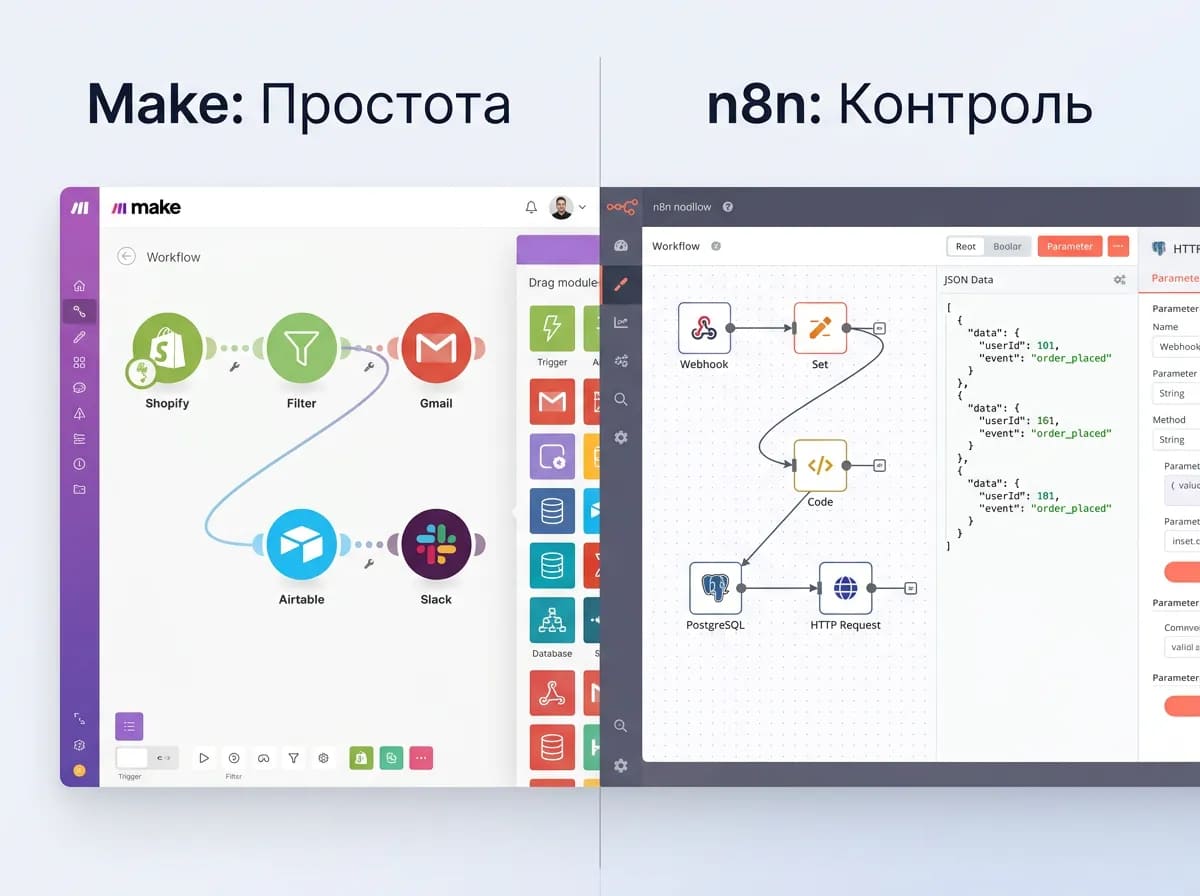
Two leaders dominate discussions of visual development: Make and n8n. Both support no-code automation, but in different ways.
Make, formerly Integromat, is a cloud service with an attractive interface. It is ideal for marketers and business owners who want to see the full process diagram. Strengths include a huge library of more than 1,000 integrations and convenient error handling. The drawback is that operation-based pricing can become expensive with complex branching.
n8n is an open-source solution you can run on your own server. Its main advantages are complete data control and minimal low-code additions when a few lines of JavaScript are unavoidable. n8n handles large JSON datasets better and suits technically capable teams. If your process needs to work around API limits or access internal databases, choose n8n.
Make suits most beginners because it is easy to learn. If you plan to expand the system and do not want to pay for each iteration, consider n8n. Both tools support AI workflows calling models from OpenAI, Claude, Kimi, DeepSeek, Gemini, Qwen, GPT, GigaChat, Grok, Llama, YandexGPT, Mistral, Cohere, and others.
Case 1: Automating candidate selection with AI
Recruiting is an ideal area for business AI agents. Consider a real situation: an HR department receives 500 resumes for one vacancy. Reviewing them all manually is impossible, and unstructured files are difficult to parse.
We configured a no-code system that does the following:
- When an email containing a resume arrives, the agent downloads the PDF.
- It extracts text using a recognition tool.
- It sends the text to GPT with the prompt: ‘Identify Python experience, English proficiency, and whether a LinkedIn profile is present.’
- It enters the results into a Google Sheet and assigns a score from 0 to 10.
- If the score exceeds 8, it automatically sends a calendar invitation for an interview.
This process previously took 10 hours per week. With no-code automation implemented in one evening, oversight fell to 20 minutes per day. Building these business AI agents required no programming: everything was assembled from existing blocks. Errors are eliminated because the agent does not tire or develop a bias against a resume’s format.
Case 2: Generating reports from Trello, Jira, and other services
The second case concerns project management. A team used Trello for tasks, Slack for communication, and Google Docs for reports. Preparing a weekly summary of who completed what had become punishing manual work.
We programmed an AI agent with the following logic:
- Every Friday at 17:00, the system exports all Trello cards marked Done.
- The agent analyzes card comments and identifies key achievements.
- Through OpenAI or another LLM, it turns dry facts into a coherent report paragraph.
- The report is uploaded to a company folder in Google Drive.
- A link to the document is automatically posted in the designated Slack channel.
The result: managers no longer spend 2 hours copying and pasting on Fridays. The tool has operated without failures for 4 months. We used webhooks to connect Trello and AI, which is typical for no-code solutions. Any service with an API can become part of this ecosystem. A task that previously required a half-time programmer is now handled through configuration without a single line of code.
Building your own AI assistant system in a few evenings
Ready to begin? You can build an AI assistant system in 2–3 evenings by following a step-by-step plan.
Evening 1: Review tasks and choose a platform.
List all routine actions repeated more than 5 times a day. Moving data between applications? Sending identical customer replies? These are candidates. Register with your chosen no-code platform; start with Make. Learn the interface: modules, routers, and aggregators. Understand how variables pass between them.
Evening 2: Build your first scenario.
Keep the scope manageable. Create one simple workflow: ‘If a new row appears in Google Sheets, send an AI-generated Telegram message.’ This teaches automation logic. Make the agent’s instructions as specific as possible: ‘You are an assistant. Format the response as a bulleted list.’
Evening 3: Integrate and test.
Connect real services. Run a test with ‘test’ in its name. See where the integration fails. Common problems include inconsistent date formats or unauthorized requests. Fix the errors. At this stage, understand that developing business AI agents is iterative. Refine the agent as you would train an intern: provide examples and correct inaccuracies.
The main secret to speed is using existing blocks. Most no-code AI platforms already have built-in integrations with ChatGPT, Slack, and CRM systems.

Practical tips for configuring and integrating agents
Follow a few engineering rules to keep your no-code automation from falling apart after a week.
Tip 1: Design for failures.
Always add an error-handling module. If an API is unavailable, the agent should retry after a specified timeout or record a log in a separate spreadsheet rather than simply fail.
Tip 2: Break down complex tasks.
Instead of one super-agent performing 100 actions, create 3–4 microservices. One collects data, another analyzes it, and a third sends the result. This system is easier to fix. This is a key difference between a good low-code solution and a poor one.
Tip 3: Use webhooks.
Scheduled triggers are useful, but webhooks from websites or applications make automation immediate. As soon as an event occurs, the agent wakes up.
Tip 4: Document variables.
With 20 modules in a workflow, it is easy to forget what {{data.body.user.id}} means. Create a variable dictionary in Notion. Programming without documentation creates chaos, even when you use visual tools instead of writing code.
Potential implementation mistakes and how to avoid them
In pursuit of efficiency, companies often repeat the same mistakes. Here are common errors when introducing business AI agents.
Mistake 1: Blind faith in intelligence.
AI is not magic. If inputs are poor—malformed PDFs or empty fields—the agent will generate polished nonsense. The rule is to clean data with regular expressions or standard platform modules before feeding it to the neural network.
Mistake 2: Ignoring limits.
Free no-code plans limit the number of operations. If your process runs every 5 minutes, you will quickly need a paid plan or face a block. Budget for operations.
Mistake 3: No human oversight.
Fully autonomous systems can be dangerous. Keep an emergency stop: for example, before sending a mass email campaign, the agent should send a draft to a manager for approval. The workflow completes only after a person reviews the result.
How can these problems be avoided? Start small. Do not try to replace an entire department in one evening. Let the first system duplicate an employee’s actions without affecting critical data. Delegate the full task cycle only once reliability is established.
Conclusion: the effectiveness of no-code AI automation
Returning to the main question: why does a business need this? No-code automation with AI agents has become an industrial tool, reducing operating costs for routine data processing by 30–40%. You stop spending time creating reports or copying contacts: the process runs itself.
No-code AI technology is available here and now. An assistant system can be built over a weekend and pays for itself in its first week through freed staff hours. Building business AI agents without programming is a new standard of flexibility, allowing companies to compete with corporations that have in-house developers.
If you want to implement these capabilities as a complete solution or train your team, explore practical programs. For an in-depth understanding of architecture, we recommend AI agent courses on SkaiLab, which examine real integration scenarios. A ready-made customer interaction solution is available under AI bot development. If you need a personal consultant to map the steps for your niche, request AI assistants and bots. Begin by automating one workflow today.
Frequently asked questions
Is it difficult to maintain these agents without a technical specialist?
Which services can be connected?
Will AI agents replace my employees?
No-code automation with AI agents delivers its greatest impact when it becomes part of systematic process optimization. The business then gains more than time savings: operations become more manageable and scalable.
If you want to identify which processes should be automated first and how to design AI agent architecture without unnecessary costs, start with systematic training.
If you already have specific tasks, such as automating routine operations, integrating services, or creating AI agent workflows for business processes, the fastest path is to review your current system and choose appropriate solutions.
In practice, existing tools can handle some tasks, such as communication or data processing automation. As processes become more complex, custom AI development and integration into existing infrastructure delivers the greatest impact.
Ultimately, the companies that benefit most move from individual automations to a unified AI agent system. The sooner you build this architecture, the sooner you gain a sustainable advantage in business speed and efficiency.